Visio Standard vs Professional: 7 Key Differences, Features, and Which One Should You Choose?
Choosing the right Microsoft Visio edition can be confusing, especially when comparing Visio Standard vs Professional. Both versions are designed to help users create professional diagrams, flowcharts, organizational charts, floor plans, network diagrams, and other visual documents. However, Visio Professional includes several advanced features that are not available in the Standard edition.
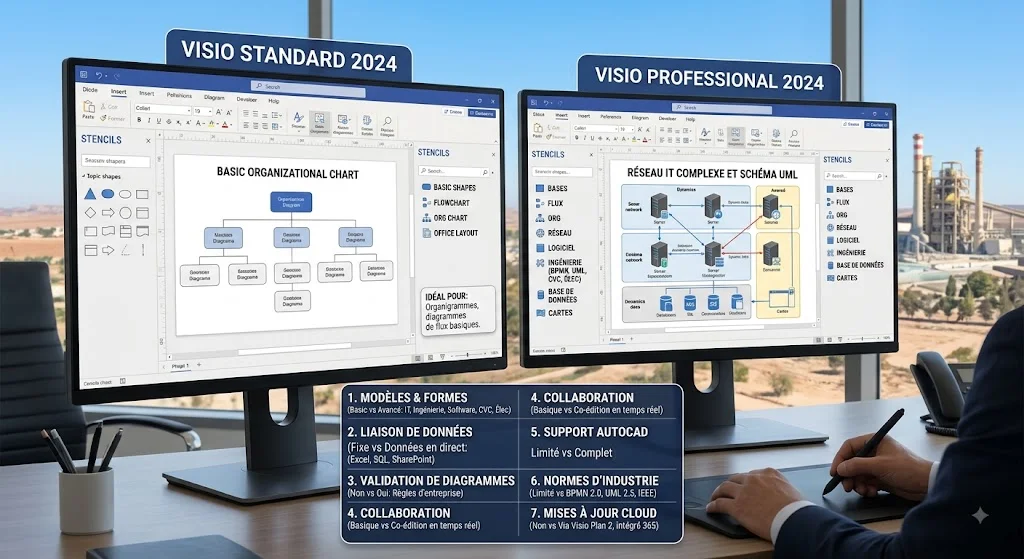
For users deciding between Visio Standard 2024 and Visio Professional 2024, the main question is simple: do you need basic diagramming tools, or do you need advanced engineering, software, database, data-linking, and industry-standard diagram capabilities?
In this guide, we’ll compare Visio Standard vs Professional in detail, explain their key differences, examine their features, and help you determine which version is the better choice for your needs.

Table of Contents
- What Is Microsoft Visio?
- Visio Standard vs Professional: Quick Comparison
- What Is Visio Standard 2024?
- What Is Visio Professional 2024?
- Visio Standard vs Professional: 7 Key Differences
- Visio Standard vs Professional Feature Comparison
- Which Visio Version Is Best for You?
- Is Visio Professional Worth It?
- Visio Standard vs Professional Pricing
- Frequently Asked Questions
- Final Verdict
What Is Microsoft Visio?
Microsoft Visio is a diagramming and visualization application designed to turn complex information into clear visual diagrams. It is commonly used for business processes, organizational structures, network architecture, engineering systems, floor plans, software models, and many other professional applications.
Microsoft offers both standalone desktop versions and subscription-based Visio plans. The Visio Standard 2024 and Visio Professional 2024 editions are one-time-purchase desktop applications licensed for one PC.
Visio 2024 also introduced updated templates, shapes, styles, a modern Office 2024 look, improved search, additional icons, sticky notes, and other usability improvements. Many of these improvements are included in both Standard and Professional.
Visio Standard vs Professional: Quick Comparison
The easiest way to understand Visio Standard vs Professional is to look at what each edition is designed to accomplish.
| Feature | Visio Standard 2024 | Visio Professional 2024 |
|---|---|---|
| Basic flowcharts | ✓ | ✓ |
| Organization charts | ✓ | ✓ |
| Gantt and PERT charts | ✓ | ✓ |
| Basic network diagrams | ✓ | ✓ |
| Floor plans | ✓ | ✓ |
| Business diagrams | ✓ | ✓ |
| Engineering diagrams | Limited | ✓ |
| Software and database diagrams | Limited | ✓ |
| UML diagrams | Limited | ✓ |
| BPMN 2.0 | — | ✓ |
| IEEE standards | — | ✓ |
| Azure architecture shapes | Limited | ✓ |
| Kubernetes shapes | — | ✓ |
| Live data connectivity | — | ✓ |
| Advanced data visualization | — | ✓ |
| One-time purchase | ✓ | ✓ |
| Desktop application | ✓ | ✓ |
Microsoft’s feature comparison confirms that Professional includes the functionality of Standard while adding specialized diagram types, engineering and software/database capabilities, industry-standard support, and advanced data features.
What Is Visio Standard 2024?
Visio Standard 2024 is designed for users who primarily need conventional business and general-purpose diagramming.
It includes templates and shapes for:
- Flowcharts
- Cross-functional flowcharts
- Workflow diagrams
- Timelines
- Calendars
- Gantt charts
- PERT charts
- Basic network diagrams
- Office layouts
- Directional maps
- Organization charts
- Business diagrams
- Brainstorming diagrams
- Block diagrams
Microsoft describes Standard as a suitable option for common diagramming requirements, while Professional expands the available diagram types for specialized users.
For a small business owner creating organizational charts, process diagrams, project schedules, or simple network maps, Standard can provide everything needed without paying for advanced functionality that may never be used.
Who Should Choose Visio Standard?
Visio Standard is a good choice for:
- Students
- Teachers
- Administrative teams
- Small businesses
- Office workers
- Project managers with basic diagramming needs
- Users creating organizational charts
- Users creating simple flowcharts
- Users creating basic floor plans
- People who don’t need advanced data integration
If your work mainly involves traditional business diagrams, Visio Standard vs Professional becomes a relatively easy decision: Standard may be sufficient.
What Is Visio Professional 2024?
Visio Professional 2024 includes the features available in Standard and adds more specialized diagramming capabilities.
Professional is intended for users working with technical, engineering, software, database, network, and data-driven diagrams.
Microsoft specifically lists additional capabilities for Professional, including engineering diagrams, software and database diagrams, and support for advanced industry standards.
Visio Professional 2024 also includes additional Azure and network/software content. Microsoft highlights more than 10 new Azure stencils as well as Kubernetes shapes and Yourdon-Coad notations in the 2024 release.
Who Should Choose Visio Professional?
Professional is particularly useful for:
- Engineers
- IT professionals
- Network administrators
- Software developers
- Database administrators
- Systems architects
- Business analysts
- Enterprise teams
- Technical project managers
- Users who need data-linked diagrams
If you work with technical diagrams regularly, the additional capabilities can make Professional much more useful than Standard.
Visio Standard vs Professional: 7 Key Differences
1. Templates and Shapes
One of the first differences you’ll notice when comparing Visio Standard vs Professional is the range of templates and shapes.
Standard provides a strong collection of templates for everyday business and general-purpose diagrams. Professional expands this collection with additional technical, engineering, software, network, and cloud-related content.
For example, Visio Professional 2024 includes additional Azure stencils, Kubernetes shapes, and Yourdon-Coad notation.
Winner: Visio Professional
2. Engineering Diagrams
If you are an engineer, this difference is especially important.
Visio Professional supports additional engineering diagram categories, including electrical, piping and instrumentation, fluid power, systems, industrial controls, circuits and logic, process flow, and parts and assembly diagrams.
Standard focuses more heavily on general business and organizational diagramming.
Therefore, engineers who need specialized technical diagrams should strongly consider Professional.
Winner: Visio Professional
3. Software and Database Diagrams
Another major difference in Visio Standard vs Professional is software and database modeling.
Professional supports diagrams such as:
- UML
- Database models
- Website diagrams
- Enterprise applications
- Data flow diagrams
- Program structures
- Website maps
- Wireframes
- Software architecture diagrams
These features are particularly valuable for developers, IT professionals, software architects, and database specialists.
If you only create business flowcharts, you probably won’t need these capabilities.
Winner: Visio Professional
4. BPMN, UML, and IEEE Standards
Professional becomes even more valuable for organizations that rely on formal diagramming standards.
Microsoft states that advanced Visio capabilities support industry standards including BPMN 2.0, UML 2.5, and IEEE. Professional users can also validate diagrams against supported business rules.
These standards can be important when diagrams must follow established technical or business-process conventions.
For casual diagramming, this feature may not matter. For professional technical work, it can be a significant advantage.
Winner: Visio Professional
5. Data Connectivity
Data connectivity is one of the biggest reasons to choose Professional.
Visio Professional can connect diagrams to data sources and use data to make diagrams more informative. Microsoft lists support for sources such as Excel, SharePoint, SQL Server, and other organizational data sources depending on the feature and licensing environment.
For example, an organization could use data to create or update organizational charts and visually represent information inside a diagram.
This can save time when dealing with large amounts of information.
Winner: Visio Professional
6. Data Visualization
Visio Professional also offers more advanced ways to visualize information using data graphics, icons, and other visual elements.
Instead of creating a completely static diagram, users can connect information to shapes and make the diagram communicate additional data.
This can be useful for:
- IT infrastructure
- Business processes
- Organizational structures
- Project information
- Network environments
- Enterprise reporting
If your diagrams are mostly static, Standard remains a practical option.
Winner: Visio Professional
7. Cloud and Network Architecture
Modern IT teams increasingly need diagrams for cloud and network environments.
Visio Professional 2024 adds specialized content for Azure and Kubernetes architectures, along with additional network and software shapes.
This makes Professional particularly attractive for:
- Cloud architects
- Network engineers
- DevOps teams
- IT administrators
- Infrastructure teams
- Software architects
Standard can handle basic network diagrams, but Professional is better suited to complex technical environments.
Winner: Visio Professional
Visio Standard vs Professional Feature Comparison
When looking at the overall difference, the key point is that Visio Professional does not replace Standard with a completely different application. Instead, Professional builds on the Standard feature set and adds specialized capabilities.
Standard is focused on general diagramming.
Professional adds advanced technical diagramming, additional templates and shapes, industry-standard support, and data-related functionality.
That distinction makes the choice easier.
If your work involves:
Simple diagrams → Standard
Advanced technical diagrams → Professional
Engineering → Professional
Software/database modeling → Professional
Data-connected diagrams → Professional
Basic business diagrams → Standard
Visio Standard vs Professional: Which One Is Best for You?
For Students
Students who only need flowcharts, organizational diagrams, project schedules, and basic visualizations should generally choose Visio Standard.
There is little reason to pay for advanced technical functionality if your coursework doesn’t require it.
For Small Businesses
For many small businesses, Standard can be enough.
If you need organizational charts, workflows, business processes, timelines, and basic diagrams, Standard provides the core tools required.
However, businesses working with IT infrastructure or complex data may benefit from Professional.
For Engineers
Visio Professional is the better choice.
The additional engineering templates and technical diagramming capabilities can be important for electrical, industrial, process, systems, and other engineering applications.
For IT Professionals
Professional is usually the stronger option for IT users.
Network architecture, cloud architecture, software diagrams, database models, UML, and specialized shapes make Professional much more versatile.
For Software Developers
Developers should strongly consider Professional because of its software and database diagramming capabilities.
UML, data-flow diagrams, program structures, website maps, and application-related diagrams can make it significantly more useful for development work.
For Project Managers
The answer depends on the type of project.
If you mainly create Gantt charts, timelines, workflows, and organizational diagrams, Standard can be enough.
If your projects involve IT systems, software architecture, engineering, or data-driven processes, Professional may be the better investment.
Is Visio Professional Worth It?
Whether Professional is worth the additional cost depends entirely on how you use Visio.
Microsoft’s current US pricing page lists Visio Standard 2024 at $309.99 and Visio Professional 2024 at $579.99 as one-time purchases for one PC. Prices can vary by market, promotions, taxes, and licensing channel.
That means Professional costs substantially more than Standard at Microsoft’s listed US price.
The extra cost is easier to justify when you actually need:
- Engineering diagrams
- Software diagrams
- Database models
- UML
- BPMN
- IEEE standards
- Azure diagrams
- Kubernetes shapes
- Data connectivity
- Advanced data visualization
If you never use those features, Standard may offer better value.
Visio Standard vs Professional: One-Time Purchase or Subscription?
Another important consideration is licensing.
Visio Standard 2024 and Professional 2024 are traditional one-time-purchase desktop products. Microsoft also offers subscription-based Visio plans with different functionality.
Microsoft currently describes Visio Plan 1 as a web-based professional diagramming option, while Visio Plan 2 provides a more comprehensive solution with web and desktop applications.
Therefore, don’t confuse:
- Visio Standard 2024
- Visio Professional 2024
- Visio Plan 1
- Visio Plan 2
- Visio in Microsoft 365
They are different licensing options with different features.
If you specifically want a one-time purchase, Standard and Professional 2024 are the relevant desktop editions.
Visio Standard vs Professional: System Requirements
Visio 2024 belongs to the current Office 2024 generation and is designed for Windows environments.
Microsoft’s published requirements for current Visio desktop products include a compatible Windows operating system, a 1.6 GHz or faster dual-core processor, 4 GB RAM for 64-bit systems, approximately 4 GB of available disk space, and a minimum 1280 × 768 display resolution.
Before purchasing, always verify the requirements for your specific edition and operating environment.
Is Visio 2024 Still a Good Choice?
Yes. For users who want a traditional desktop diagramming application without a recurring subscription, Visio 2024 remains an important option.
Microsoft’s lifecycle documentation lists October 1, 2024 as the start date for Visio 2024 and October 9, 2029 as its retirement date under the Modern Lifecycle Policy.
Visio 2024 also introduces updated templates, shapes, styles, search, and the Office 2024 visual theme.
Users still running older editions should also consider their support status. Microsoft states that Visio 2016 and Visio 2019 reached the end of support on October 14, 2025.
Frequently Asked Questions
Is Visio Standard better than Professional?
Not necessarily. Standard is better for users who only need general-purpose diagramming and want to avoid paying for advanced features. Professional is better for technical, engineering, software, database, network, and data-connected diagramming.
What is the main difference between Visio Standard vs Professional?
The main difference is the range of specialized capabilities. Professional includes everything in Standard while adding more technical templates and shapes, engineering and software/database diagrams, support for standards such as BPMN 2.0, UML 2.5 and IEEE, plus advanced data-related features.
Can Visio Standard create flowcharts?
Yes. Standard includes several types of flowcharts, including basic, cross-functional, and workflow diagrams.
Can Visio Standard create network diagrams?
Yes. Standard supports basic network diagrams. Professional provides additional network and software-related capabilities and specialized shapes.
Does Visio Professional include everything in Standard?
Yes. Microsoft describes Professional as including the functionality of Standard plus additional diagram types and advanced capabilities.
Is Visio Professional good for software developers?
Yes. Professional is particularly useful for software developers because it supports software and database diagrams, UML-related diagramming, data-flow diagrams, program structures, website maps, and other technical diagrams.
Is Visio Standard enough for a small business?
For many small businesses, yes. If you mainly need organizational charts, workflows, business diagrams, timelines, Gantt charts, and basic network diagrams, Standard can be sufficient.
Does Visio 2024 work as a one-time purchase?
Yes. Both Visio Standard 2024 and Visio Professional 2024 are available as one-time-purchase desktop editions licensed for one PC.
Final Verdict: Visio Standard vs Professional
The choice between Visio Standard vs Professional ultimately comes down to the complexity of your diagramming requirements.
Choose Visio Standard 2024 if you need:
- Flowcharts
- Organizational charts
- Gantt charts
- Timelines
- Basic network diagrams
- Floor plans
- Business diagrams
- General-purpose diagramming
Choose Visio Professional 2024 if you need:
- Engineering diagrams
- Software and database diagrams
- UML
- BPMN 2.0
- IEEE standards
- Azure architecture diagrams
- Kubernetes shapes
- Advanced network diagrams
- Data-connected diagrams
- Advanced data visualization
For everyday business and personal diagramming, Visio Standard can provide excellent value. For technical professionals and organizations that depend on advanced diagramming, Visio Professional is the more complete solution.
In short: Standard is the better choice for basic diagramming, while Professional is the better choice for advanced technical and data-driven work.
If you’re buying Visio specifically for professional work, compare the features you actually need before choosing an edition. Paying for Professional makes the most sense when you’ll use its advanced capabilities rather than simply having access to them.