Adobe Acrobat vs Acrobat Pro: 7 Key Differences You Should Know Before Buying
If you’re comparing Adobe Acrobat vs Acrobat Pro, you’re probably wondering whether the Pro version is really worth the extra cost. Both options provide powerful tools for creating, editing, converting, organizing, signing, and protecting PDF documents, but they are designed for different levels of users.
For basic PDF tasks, Acrobat Standard can be enough. However, professionals who regularly work with scanned documents, sensitive information, PDF comparisons, forms, or large numbers of electronic signatures may benefit significantly from Acrobat Pro.
In this guide, we’ll compare Adobe Acrobat vs Acrobat Pro feature by feature, explain the main differences, and help you decide which version is right for your needs.
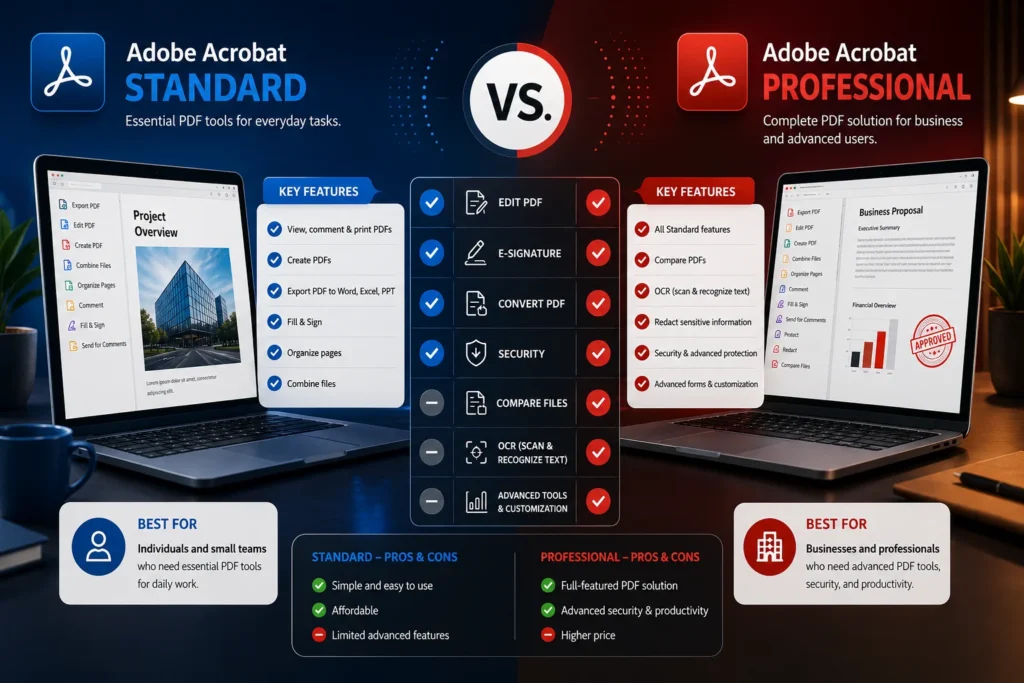
Table of Contents
- What Is Adobe Acrobat?
- Adobe Acrobat vs Acrobat Pro: What’s the Difference?
- Acrobat Standard vs Acrobat Pro Comparison
- PDF Editing
- PDF Conversion
- OCR and Scanned Documents
- Comparing PDFs
- Redacting Sensitive Information
- Forms and E-Signatures
- Which Version Is Better for You?
- Is Adobe Acrobat Pro Worth It?
- Adobe Acrobat Pricing
- Adobe Acrobat vs Acrobat Pro: Final Verdict
- Frequently Asked Questions
What Is Adobe Acrobat?
Adobe Acrobat is Adobe’s professional PDF platform for creating, editing, converting, signing, sharing, and protecting PDF documents.
It is different from Adobe Acrobat Reader, which is primarily designed for viewing, printing, commenting on, and sharing PDFs.
The paid Acrobat plans provide significantly more functionality. Depending on the plan, users can edit text and images, convert files, organize pages, fill out forms, request electronic signatures, protect documents, and perform advanced PDF workflows.
Adobe currently positions Acrobat Standard as a simpler PDF solution, while Acrobat Pro is designed for more advanced PDF and e-signature workflows.
Adobe Acrobat vs Acrobat Pro: What’s the Difference?
The easiest way to understand Adobe Acrobat vs Acrobat Pro is to think about the difference between everyday PDF work and professional PDF workflows.
Acrobat Standard provides the essential tools most users need:
- Edit PDF text and images
- Convert documents to and from PDF
- Organize PDF pages
- Fill out forms
- Sign documents
- Request electronic signatures
- Protect PDFs with passwords
Acrobat Pro includes those core capabilities but adds more advanced functionality, including:
- OCR for scanned documents
- PDF comparison
- Sensitive-information redaction
- Web forms
- Reusable e-signature templates
- Bulk e-signature requests
- Additional advanced PDF features
Adobe confirms that Acrobat Pro includes the functionality of Standard plus these advanced PDF and e-signature tools.
Acrobat Standard vs Acrobat Pro Comparison
| Feature | Acrobat Standard | Acrobat Pro |
|---|---|---|
| View PDFs | Yes | Yes |
| Edit text and images | Yes | Yes |
| Convert PDFs | Yes | Yes |
| Organize pages | Yes | Yes |
| Fill and sign forms | Yes | Yes |
| Request e-signatures | Yes | Yes |
| Password protection | Yes | Yes |
| OCR for scanned documents | Limited/No | Yes |
| Compare PDFs | No | Yes |
| Redact sensitive information | No | Yes |
| Web forms | No | Yes |
| Reusable e-sign templates | Limited | Yes |
| Bulk e-signature requests | Limited | Yes |
| Advanced professional PDF workflows | Limited | Yes |
The exact features available can depend on the current Adobe plan and platform, so it’s worth checking Adobe’s official comparison page before purchasing.
1. PDF Editing
One of the biggest similarities when comparing Adobe Acrobat vs Acrobat Pro is PDF editing.
Both versions allow users to make changes to PDF documents, including editing text and images.
This is useful when you need to correct a typo, update a date, replace an image, or make small changes without returning to the original Word or design file.
For everyday PDF editing, Acrobat Standard may provide everything you need.
If your workflow involves more complex document management, however, Pro becomes more attractive because it combines basic editing with advanced PDF tools.
Who needs PDF editing?
Acrobat Standard can be suitable for:
- Students
- Home users
- Freelancers
- People who occasionally edit PDFs
- Small businesses with basic PDF requirements
Acrobat Pro is better suited to:
- Legal professionals
- Accountants
- HR departments
- Managers
- Designers
- Researchers
- Businesses handling large PDF workflows
2. PDF Conversion
Another important part of the Adobe Acrobat vs Acrobat Pro comparison is document conversion.
Acrobat allows users to convert documents to and from PDF formats. This can be useful when working with Microsoft Word documents, spreadsheets, presentations, and other common file types.
For example, you might need to convert a Word document into a professional PDF before sending it to a client.
You may also need to convert a PDF back into an editable format.
Both Standard and Pro support important conversion workflows, making either option useful for everyday office productivity.
3. OCR and Scanned Documents
This is one of the most important differences between Acrobat Standard vs Acrobat Pro.
OCR, or Optical Character Recognition, allows software to recognize text inside scanned documents and images.
Imagine scanning a printed contract.
Without OCR, the resulting PDF may essentially be an image. You can look at the words, but the computer may not recognize them as editable or searchable text.
Acrobat Pro can turn scanned documents into editable and searchable PDFs using OCR.
This can be extremely useful for:
- Scanned contracts
- Old documents
- Receipts
- Invoices
- Books
- Research papers
- Archived business documents
If you regularly work with scanned files, Adobe Acrobat Pro becomes much more compelling.
4. Comparing PDFs
PDF comparison is another major advantage of Acrobat Pro.
Suppose you receive two versions of a 40-page contract. Reading both documents manually to find every difference can take considerable time.
Acrobat Pro can compare PDFs to help identify changes between document versions. Adobe specifically lists PDF comparison as a Pro feature.
This is particularly valuable for:
- Contracts
- Legal documents
- Reports
- Proposals
- Technical documentation
- Updated policies
- Business agreements
If comparing document versions is part of your daily work, the additional Pro functionality can save significant time.
5. Redacting Sensitive Information
Security is another area where Adobe Acrobat vs Acrobat Pro becomes an important comparison.
Redaction allows you to permanently remove sensitive information from a PDF.
For example, a company may need to remove:
- Personal addresses
- Phone numbers
- Financial information
- Identification numbers
- Confidential business information
- Private client details
Simply placing a black rectangle over sensitive information isn’t necessarily sufficient. Professional redaction tools are designed to permanently remove the underlying information.
Adobe lists redaction among the advanced capabilities available in Acrobat Pro.
For organizations dealing with confidential documents, this can be a significant reason to choose Pro.
6. Forms and E-Signatures
Both Acrobat Standard and Pro support important electronic-signature workflows.
You can fill out forms, sign documents, and request electronic signatures.
However, Acrobat Pro expands these capabilities with advanced functionality such as web forms, reusable e-signature templates, and bulk signature workflows.
This matters when you’re sending documents to multiple people.
For example, an HR department may need employees to sign the same type of document repeatedly.
A freelancer may need clients to sign contracts.
A business may need multiple customers or partners to complete agreements.
For occasional signing, Standard may be sufficient.
For professional document workflows, Pro can provide much more flexibility.
7. Which Version Is Better for You?
The best choice in the Adobe Acrobat vs Acrobat Pro comparison depends on how you use PDFs.
Choose Acrobat Standard if:
- You mainly edit PDFs
- You convert files to PDF
- You organize PDF pages
- You fill out forms
- You sign documents
- You occasionally request signatures
- You don’t need advanced OCR
- You rarely compare PDF versions
- You don’t need professional redaction
For these users, paying extra for Pro may not provide enough additional value.
Choose Acrobat Pro if:
- You work with PDFs every day
- You frequently use scanned documents
- You need OCR
- You compare different versions of PDFs
- You handle confidential information
- You need professional redaction
- You create web forms
- You use reusable e-signature templates
- You send multiple signature requests
- You manage professional document workflows
For these users, Pro can justify the additional investment.
Is Adobe Acrobat Pro Worth It?
Whether Acrobat Pro is worth it depends on the features you actually use.
If you only need to edit a PDF once in a while, Acrobat Standard can be the more economical choice.
However, if your work depends heavily on PDF documents, the advanced features can make Pro worthwhile.
For example, consider someone who compares contracts every week.
The PDF comparison feature alone can reduce the amount of manual work required.
A business handling confidential customer documents may also benefit from professional redaction.
Similarly, a company processing large numbers of scanned documents can benefit from OCR.
In other words, the question isn’t simply whether Pro costs more.
The better question is:
Will the additional Pro features save you enough time or improve your workflow enough to justify the difference?
For professional users, the answer can often be yes.
Adobe Acrobat Pricing
Adobe offers different Acrobat plans, and pricing can change depending on the country, billing method, promotions, and whether you choose an individual or business plan.
At the time of writing, Adobe’s U.S. comparison page lists Acrobat Standard at US$14.99/month when billed annually and Acrobat Pro at US$19.99/month when billed annually for the listed individual plans. Adobe also offers monthly options and other Acrobat products.
Because Adobe regularly updates its plans and pricing, always check the current official pricing before purchasing.
Check Adobe’s official Acrobat comparison page
Adobe Acrobat vs Acrobat Pro: Final Verdict
So, who wins the Adobe Acrobat vs Acrobat Pro comparison?
For basic PDF tasks, Acrobat Standard is a strong choice. It provides the essential tools needed to edit, convert, organize, sign, and protect PDF documents.
For advanced professional workflows, Acrobat Pro is the better option.
Its additional capabilities—including OCR for scanned documents, PDF comparison, redaction, advanced forms, and expanded e-signature functionality—make it more suitable for professionals and businesses.
Quick recommendation
Choose Acrobat Standard if you want essential PDF tools at a lower price.
Choose Acrobat Pro if you need advanced PDF editing, OCR, comparison, redaction, forms, and professional e-signature workflows.
If you’re still unsure, think about the PDF tasks you perform most frequently. If you regularly use the advanced features listed above, upgrading to Pro can save time and make your workflow considerably more efficient.
Frequently Asked Questions
Is Adobe Acrobat the same as Acrobat Pro?
No. Acrobat is the broader Adobe PDF platform, while Acrobat Pro is a specific paid plan that includes advanced PDF and e-signature capabilities.
What is the difference between Adobe Acrobat and Acrobat Pro?
The main difference is the level of functionality. Acrobat Standard provides core PDF editing, conversion, organization, forms, signing, and protection. Acrobat Pro adds advanced features such as OCR, PDF comparison, redaction, web forms, reusable templates, and bulk e-signatures.
Is Acrobat Pro better than Acrobat Standard?
For professional PDF workflows, yes. Pro offers more advanced tools. For basic PDF editing and signing, Standard may be enough.
Can Acrobat Pro edit PDFs?
Yes. Acrobat Pro can edit PDF text and images, as well as perform many other PDF management tasks.
Does Acrobat Pro include OCR?
Yes. Adobe lists the ability to turn scanned documents into editable and searchable PDFs among Acrobat Pro’s advanced features.
Can Acrobat Pro compare two PDFs?
Yes. PDF comparison is one of the advanced features included with Acrobat Pro.
Can Acrobat Pro redact PDFs?
Yes. Acrobat Pro provides tools for redacting sensitive information from PDFs.
Is Acrobat Reader the same as Acrobat Pro?
No. Acrobat Reader is primarily a free PDF viewer and basic PDF interaction tool, while Acrobat Pro is a paid solution with advanced editing, conversion, security, comparison, and e-signature features.
Related Resources
If you’re comparing Adobe products before buying, you may also want to explore other software guides on eshopbest.com, including Microsoft Office, Windows, and productivity software comparisons.
For the most accurate Adobe feature information, consult Adobe’s official product documentation and comparison pages before making your final purchase decision.