Can You Buy Microsoft Office Without a Subscription? 7 Best Options Explained
Can you buy Microsoft Office without a subscription? Yes. Microsoft offers Office 2024 as a one-time purchase, meaning you pay once rather than paying a recurring monthly or yearly Microsoft 365 subscription. Microsoft confirms that Office 2024 is available as a one-time purchase for a PC or Mac.
This makes Office 2024 an attractive option for people who want traditional Microsoft Office applications without committing to a Microsoft 365 subscription.
But there is an important difference between buying Office once and subscribing to Microsoft 365. The two options offer different features, update models, cloud services, and licensing arrangements.
If you’re searching can you buy microsoft office without a subscription, this guide will help you understand your options and choose the right Office solution for your computer.
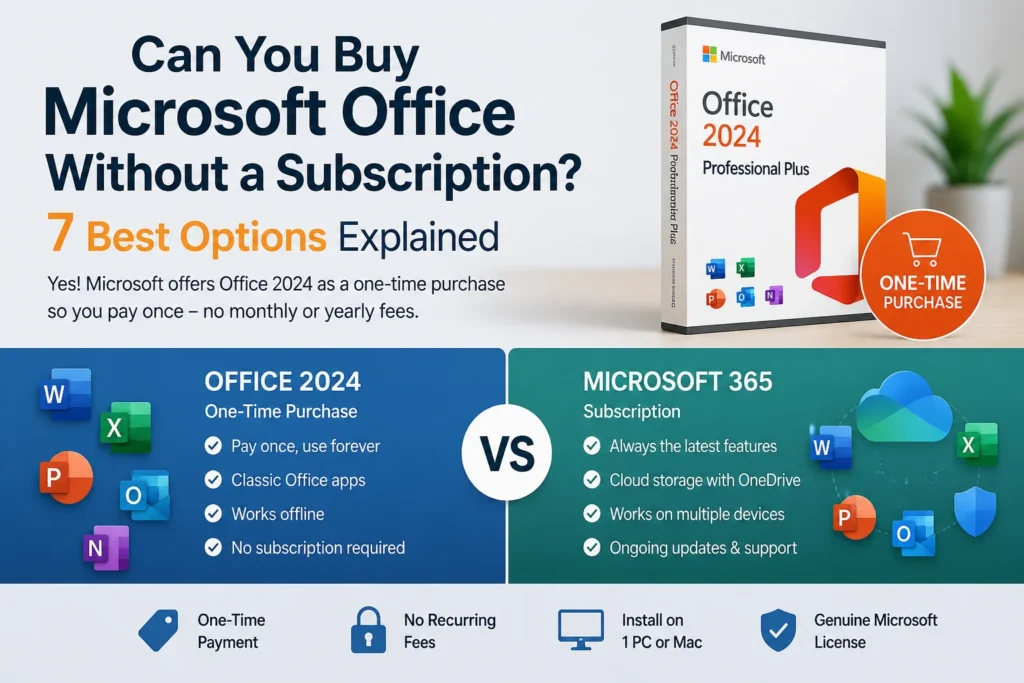
Table of Contents
- Can You Buy Microsoft Office Without a Subscription?
- What Is Office 2024?
- Office 2024 vs Microsoft 365
- 7 Reasons to Buy Office Without a Subscription
- Which Office 2024 Version Should You Choose?
- Office 2024 Professional Plus
- Microsoft Office 2024 for Mac
- When Microsoft 365 Is the Better Choice
- How to Buy Microsoft Office Without a Subscription
- What Happens After You Buy Office?
- Frequently Asked Questions
- Final Verdict
Can You Buy Microsoft Office Without a Subscription?
Can you buy microsoft office without a subscription? Absolutely.
Microsoft sells Office 2024 as a one-time purchase, so you can pay once and use the included Office applications without maintaining a Microsoft 365 subscription. Microsoft describes Office 2024 as a non-subscription product available for PC and Mac.
This is different from Microsoft 365.
With Microsoft 365, you pay monthly or annually and continue receiving the latest application versions, feature updates, and subscription services included with your plan.
With a one-time Office purchase, you purchase a specific version.
For many users, that distinction is extremely important.
If you primarily need Word, Excel, PowerPoint, and other traditional Office applications and don’t need the additional Microsoft 365 subscription services, a one-time purchase can be a straightforward alternative.
What Is Office 2024?
Office 2024 is Microsoft’s current non-subscription Office generation.
Microsoft describes Office 2024 as providing classic versions of applications such as Word, Excel, PowerPoint, and OneNote through a one-time purchase. Office Home & Business 2024 also includes Outlook.
Unlike Microsoft 365, Office 2024 doesn’t automatically upgrade to the next major Office version.
For example, buying Office 2024 doesn’t automatically give you a future Office 2027 release if Microsoft launches one later.
Microsoft specifically states that one-time purchases don’t include an upgrade option to the next major version.
That makes Office 2024 particularly suitable for buyers who prefer predictable, one-time software costs.
Office 2024 vs Microsoft 365
If you’re asking can you buy microsoft office without a subscription, the biggest decision is whether you need a one-time Office license or the broader Microsoft 365 subscription experience.
| Feature | Office 2024 | Microsoft 365 |
|---|---|---|
| Payment | One-time purchase | Monthly/yearly subscription |
| Word | Yes, depending on edition | Yes |
| Excel | Yes, depending on edition | Yes |
| PowerPoint | Yes, depending on edition | Yes |
| Outlook | Included with certain editions | Included with applicable plans |
| Major version upgrades | Not included | Included while subscribed |
| Cloud services | Limited compared with Microsoft 365 | Included with applicable plans |
| OneDrive storage | Not included as a Microsoft 365 subscription benefit | Included with applicable plans |
| Subscription required | No | Yes |
Microsoft confirms that Office 2024 is a one-time purchase, while Microsoft 365 provides the latest versions of the applications and additional services such as cloud storage depending on the plan.
7 Reasons to Buy Office Without a Subscription
There are several reasons why users search can you buy microsoft office without a subscription before choosing Microsoft 365.
1. Pay Once
The biggest advantage is simple: you make a one-time purchase instead of maintaining a recurring subscription.
This can make budgeting easier.
2. No Recurring Office Payment
If you don’t want another monthly or annual software bill, a one-time Office purchase can be more convenient.
Once you’ve purchased the appropriate license, you don’t need to maintain a Microsoft 365 subscription simply to continue using the purchased Office version, subject to the license terms.
3. Classic Office Applications
Office 2024 provides the traditional desktop Office experience.
Depending on the edition, you can get applications such as:
- Word
- Excel
- PowerPoint
- OneNote
- Outlook
Microsoft’s official Office documentation confirms that one-time Office suites include classic desktop applications rather than the complete collection of Microsoft 365 subscription services.
4. Good for Traditional Desktop Users
If you primarily work on one computer and don’t need extensive cloud services, Office 2024 can be a practical choice.
It’s especially suitable for users who want familiar desktop applications without subscribing to a broader cloud productivity package.
5. No Need to Upgrade Every Year
A one-time purchase doesn’t require you to purchase a new version every year.
You can continue using the supported version according to its license and lifecycle.
Office 2024 is currently listed by Microsoft with support through October 9, 2029.
6. Available for PC and Mac
Office 2024 is available for both Windows PCs and Macs, although the exact applications depend on the edition.
This is useful if you’re looking for Office without a subscription on macOS.
7. Easier Cost Planning
For someone who wants a fixed software expense, paying once can be easier to understand than maintaining a recurring subscription.
However, you should always compare the features you actually need before choosing between the two models.
Which Office 2024 Version Should You Choose?
If you’ve decided that you don’t want a subscription, the next question is which Office edition is right for you.
Microsoft offers different one-time Office products.
Office Home 2024
Office Home 2024 is designed for students and families and includes classic versions of Word, Excel, PowerPoint, and OneNote for one PC or Mac.
It’s a good choice for basic personal or educational productivity.
Office Home & Business 2024
Office Home & Business 2024 adds Outlook and is intended for families and small businesses.
This makes it more suitable for users who need email and calendar functionality alongside traditional Office applications.
Office Professional Editions
Professional Office editions can provide additional applications and features depending on the specific product and licensing terms.
Before purchasing, carefully check exactly which applications are included.
Office 2024 Professional Plus
If your main goal is to buy Microsoft Office without a subscription, a Professional Plus-style Office package can be an option worth considering, provided the license is appropriate for your use.
You can see the Office 2024 Professional Plus product available from EshopBest here:
Office 2024 Professional Plus – EshopBest
Before buying any Office license, check the product page for the exact edition, supported operating system, number of devices, license terms, activation method, and delivery information.
The key point is to make sure the product you’re purchasing actually matches your requirements.
Microsoft Office 2024 for Mac
Mac users who ask can you buy microsoft office without a subscription also have a one-time Office option.
Microsoft confirms that Office 2024 is available for Mac as well as PC.
If you’re looking specifically for Office 2024 for macOS, you can explore:
Microsoft Office 2024 HB for Mac – EshopBest
This can be particularly useful if you want traditional Office applications on a Mac without maintaining a Microsoft 365 subscription.
Before purchasing, verify your Mac’s operating-system compatibility and the exact applications included with the product.
When Microsoft 365 Is the Better Choice
Although this article answers can you buy microsoft office without a subscription with a clear “yes,” a subscription can still be the better choice for some users.
Microsoft 365 may be preferable if you need:
- The latest Office features
- Continuous feature updates
- Cloud storage
- Multiple-device access
- Collaboration features
- Microsoft 365 subscription services
- Regular application upgrades
Microsoft states that Microsoft 365 subscribers receive the latest versions of the applications and ongoing feature, security, and bug-fix updates.
If you use several devices and want your Office experience to remain continuously updated, Microsoft 365 may offer better overall flexibility.
Office 2024 or Microsoft 365: Which Is Better?
There isn’t one answer for everyone.
Choose Office 2024 if:
- You prefer a one-time purchase.
- You don’t want a recurring subscription.
- You primarily need desktop Office applications.
- You don’t need the full collection of Microsoft 365 cloud services.
- You are comfortable using a specific Office version.
Choose Microsoft 365 if:
- You want the newest features continuously.
- You work across multiple devices.
- You need subscription services such as OneDrive storage.
- You want ongoing feature upgrades.
- You prefer paying monthly or annually.
Microsoft’s comparison documentation confirms that the one-time Office model and Microsoft 365 subscription model are designed for different needs.
How to Buy Microsoft Office Without a Subscription
If you’re ready to buy Microsoft Office without a subscription, follow a few simple steps.
Step 1: Decide Which Office Edition You Need
First determine whether you need:
- Office Home 2024
- Office Home & Business 2024
- Office Professional edition
- Office 2024 for Mac
Don’t purchase based solely on the product name.
Check the exact applications included.
Step 2: Check Your Operating System
Make sure the Office edition is compatible with your computer.
A Windows Office product and a Mac Office product may have different requirements and included applications.
Step 3: Verify the License
Check:
- Number of devices
- License type
- Activation method
- Region
- Transfer conditions
- Supported operating system
Microsoft’s documentation states that one-time Office purchases are generally installed on one PC or Mac, with specific license terms governing transfers.
Step 4: Choose Your Seller
When purchasing digitally, choose a seller that clearly explains the product and licensing conditions.
Avoid listings that don’t explain what you’re actually purchasing.
Step 5: Complete the Purchase
After selecting the appropriate product, complete the checkout process.
For digital products, delivery is generally provided electronically according to the seller’s stated delivery process.
Step 6: Install and Activate Office
Microsoft provides official installation instructions for Office 2024 on PC and Mac.
Follow the activation instructions associated with your legitimate license.
What Happens After You Buy Office?
After purchasing a one-time Office license, you’ll generally need to associate the product with the appropriate Microsoft account and install the software.
Microsoft provides an official setup process for Office products.
The exact process can depend on the product you purchased.
One important difference is that a one-time Office purchase doesn’t turn into a Microsoft 365 subscription.
You receive the specific Office version associated with your license.
Can You Use Office Without Internet?
Yes, desktop Office applications can generally be used offline after installation and activation.
However, you may need an internet connection initially to install and activate the software.
Microsoft explains that one-time Office purchases are desktop applications, while Microsoft 365 includes additional cloud-connected services.
This makes a one-time purchase attractive for users who mainly work with locally stored documents.
What You Don’t Get With a One-Time Office Purchase
A common mistake is assuming that buying Office 2024 gives you every Microsoft 365 benefit.
It doesn’t.
Microsoft states that one-time Office suites don’t include the services provided with Microsoft 365, such as OneDrive, Exchange Online, and SharePoint Online.
You also don’t automatically receive the next major Office version.
For example, purchasing Office 2024 doesn’t automatically entitle you to a future major release.
That’s one of the main differences between the two purchasing models.
What About Office 365 Pro Plus?
If you prefer a subscription rather than a one-time Office purchase, EshopBest also offers an Office 365 Pro Plus subscription:
Office 365 Pro Plus Subscription – EshopBest
This is the alternative to consider if you want a subscription-based Office experience rather than a one-time Office purchase.
The product page describes features such as multi-device access, regular updates, and cloud integration.
Make sure you review the exact subscription duration and licensing terms before purchasing.
Frequently Asked Questions
Can you buy Microsoft Office without a subscription?
Yes. Microsoft sells Office 2024 as a one-time purchase, so you can buy a specific Office version without maintaining a Microsoft 365 subscription.
Is Office 2024 a one-time purchase?
Yes. Microsoft describes Office 2024 as a one-time purchase for PC or Mac.
Do I need Microsoft 365 to use Word and Excel?
No. You can purchase certain Office editions as one-time products. Microsoft 365 is the subscription option, while Office 2024 provides a non-subscription alternative.
Does Office 2024 include OneDrive?
A one-time Office purchase does not include the Microsoft 365 cloud-service package. Microsoft specifically distinguishes one-time Office suites from Microsoft 365 services such as OneDrive.
Can I install Office 2024 on more than one computer?
The standard one-time purchase is generally licensed for one PC or Mac. Microsoft provides specific rules concerning transfers to another computer.
Does Office 2024 receive updates?
Office 2024 receives security updates during its supported lifecycle, but it does not receive new feature upgrades in the same way as Microsoft 365.See Microsoft’s Office 2024 lifecycle information for details about updates and support.
Is Microsoft 365 better than Office 2024?
It depends on your needs. Microsoft 365 is better suited to users who want ongoing updates, cloud services, and subscription benefits. Office 2024 is better suited to users who prefer a one-time purchase.
Can I buy Office 2024 for Mac without a subscription?
Yes. Microsoft confirms that Office 2024 is available for Mac as a one-time purchase.
Final Verdict
So, can you buy microsoft office without a subscription? Yes — and Office 2024 is Microsoft’s main current one-time purchase option.
If you want Word, Excel, PowerPoint, and other traditional Office applications without paying a recurring Microsoft 365 subscription, a compatible Office 2024 edition can be a practical solution.
The best choice depends on how you use Office.
Choose a one-time Office purchase if you want:
- One upfront payment
- Traditional desktop Office applications
- No recurring Microsoft 365 subscription
- A specific Office version
- PC or Mac compatibility depending on the edition
Choose Microsoft 365 if you want:
- Continuous feature updates
- The latest Office applications
- Cloud services
- Multi-device flexibility
- Ongoing subscription benefits
For users looking for a non-subscription option, you can explore the Office 2024 Professional Plus offer from EshopBest, while Mac users can check the Microsoft Office 2024 HB for Mac option.
If you prefer a subscription with cloud-connected features and regular updates, the Office 365 Pro Plus subscription is the alternative.
Ultimately, the right choice isn’t simply about finding the cheapest Office product. It’s about choosing the licensing model that matches your devices, applications, budget, and long-term needs.